If you are new to Affiliate Marketing, opening an Affiliate Network dashboard for the first time can be a little overwhelming.
CPA, CPL, CPS, CR, EPC, CTR, Payout, GEO, Cap, Hold… None of these terms is particularly complicated on its own. The confusing part is understanding what they mean and how they fit together.
The basic logic of Affiliate Marketing is actually quite simple:
Find the right Offer → Get qualified Traffic → Generate Conversions → Earn Payouts → Subtract Traffic Costs → Calculate Profit
This guide starts with the basic concepts of Affiliate Marketing and gradually explains common terms such as Offer, Conversion, Payout, CPA, CR, EPC, GEO, Traffic, and Media Buying.
The goal is not to teach you how to run a full-scale campaign. Instead, it is to help you build a solid understanding of how Affiliate Marketing works and how the most common terms and metrics are connected.
Note: Tracking, Postback, S2S, and other technical topics are outside the scope of this beginner guide and can be covered separately.
How Does Affiliate Marketing Work?
Before learning individual terms, it helps to understand the basic Affiliate Marketing process.
Affiliate Marketing can be thought of as a performance-based marketing model. An Advertiser has a product or service but does not necessarily handle all customer acquisition directly. Instead, the Advertiser can work with an Affiliate Network and Affiliates to acquire users.
When a user completes an action specified by the Advertiser, the Affiliate receives a commission.
A simplified flow looks like this:
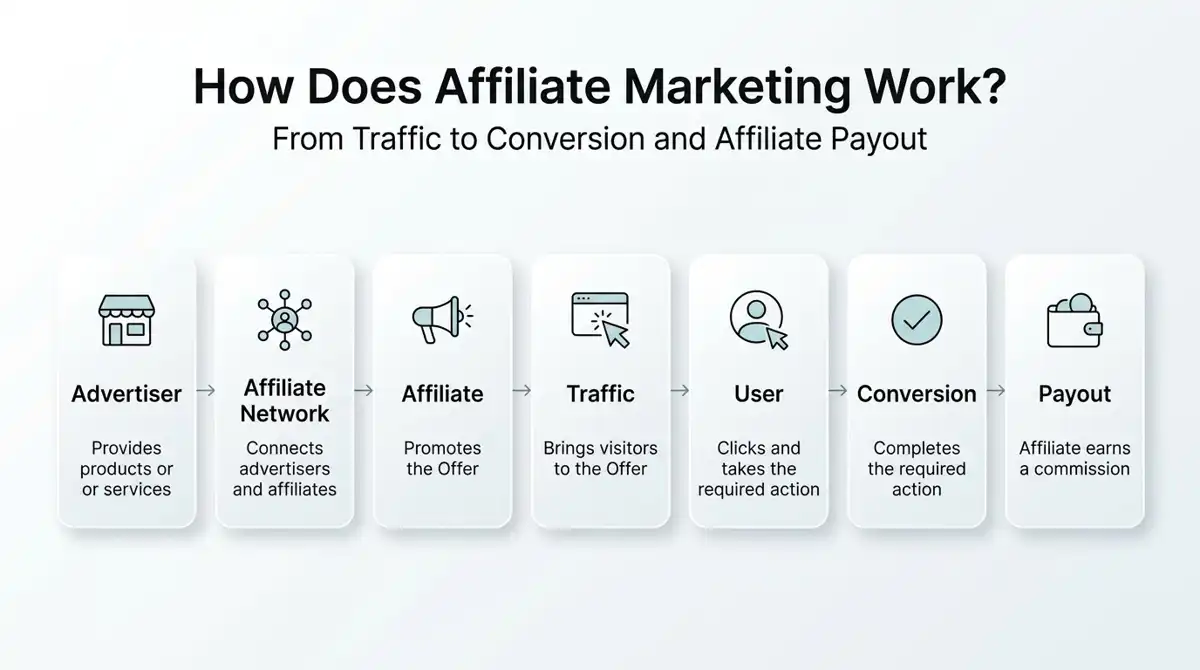
For example, imagine a company wants to promote its mobile app.
The company publishes an App Install Offer through an Affiliate Network and offers a $3 Payout for each qualified installation, an Affiliate gets the tracking link and sends traffic through a website, SEO, social media, or paid advertising.
If a user completes the required installation, the Affiliate earns the corresponding Payout, there is one important point beginners often misunderstand:
A click does not mean you have made money.
The event that actually determines whether you earn a commission is the Conversion.
Affiliate, Advertiser, Publisher, and Affiliate Network
Once you understand the basic process, the next step is to understand the main participants.
| Term | Meaning |
|---|---|
| Affiliate | A person or business that promotes Offers and earns commissions based on results |
| Publisher | Another common term for an Affiliate |
| Advertiser | A company that owns a product or service and wants to acquire users or sales |
| Affiliate Network | A platform that connects Advertisers and Affiliates |
| Affiliate Manager | A person who manages Affiliates, Offers, and business relationships |
| User | The person who visits an advertisement or Offer and may complete a Conversion |
In many situations, Affiliate and Publisher refer to essentially the same role.
For example, if you operate a website and recommend products using Affiliate Links, you can be considered both an Affiliate and a Publisher.
The Affiliate Network acts as the middle layer. Depending on the platform, Affiliates can use the network to find Offers, check Payouts, request approval, and monitor Conversion data.
What Is an Offer?
If Affiliate Marketing is a transaction, an Offer is the specific promotion you are trying to promote.
An Offer could be:
- A mobile app installation
- A game registration
- An insurance form
- A financial application
- An e-commerce product
- A free trial
- A subscription service
An Offer will typically contain information such as:
| Information | Meaning |
|---|---|
| Offer Name | The name of the Offer |
| GEO | The countries or regions where the Offer can be promoted |
| Payout | The commission paid for each valid Conversion |
| Conversion | The action the user needs to complete |
| Traffic Type | The types of Traffic allowed |
| Cap | The maximum number of Conversions allowed within a certain period |
| Hold | The period during which Conversions may remain pending before final approval |
| Restrictions | Rules and limitations imposed by the Advertiser |
For example, you might see an Offer like this:
Offer: MobileAppInstall
GEO: US
Payout: $4
Conversion: FirstTimeInstall
Traffic: Social / Display
Daily Cap: 100
This means the Offer targets users in the United States. A qualified first-time installation can generate a $4 Payout, with a maximum of 100 Conversions per day, while Social and Display Traffic are allowed.
Don’t Choose an Offer Based Only on Payout
One of the easiest mistakes for beginners is to focus entirely on the Payout.
An Offer with a $10 Payout may look much better than one paying $3, but if the $10 Offer has a very low Conversion Rate, or does not allow the type of Traffic you have, it may actually perform worse.
Payout needs to be considered together with CR, Traffic Cost, Traffic Restrictions, and other Offer conditions.
What Is a Conversion?
After understanding the Offer, the next important concept is the Conversion, a Conversion occurs when a user completes the target action specified by the Advertiser.
The required action depends on the Offer.
| Offer Type | Possible Conversion |
|---|---|
| App Install | User installs an app |
| Registration | User completes registration |
| Lead Generation | User submits a valid form |
| Free Trial | User starts a free trial |
| Subscription | User completes a subscription |
| E-commerce | User completes a purchase |
| Game | User installs a game or completes a specified condition |
For example, if an Offer requires registration:
Click → Registration Completed → Conversion
If a user only clicks the Affiliate Link and then leaves the page, there is no Conversion.
This is why the basic Affiliate funnel can be understood as:
Impression → Click → Landing Page / Offer → Conversion → Payout
What Are Payout and Commission?
Payout usually refers to the amount an Affiliate can earn from one valid Conversion.
For example, if an Offer has an $8 Payout, one valid Conversion can generate $8.
If you generate 20 valid Conversions: 20 × $8 = $160
However, the important word here is valid.
A Conversion shown in an Affiliate Network dashboard does not necessarily mean the money has been permanently confirmed. Some networks and Advertisers review Conversions for fraud, quality, refunds, or other issues.
Therefore: Payout is the commission associated with a Conversion, not your final profit.
CPA, CPS, CPL, and CPI Explained
Affiliate Offers can use different pricing models. The main difference is usually the action that triggers the commission.
| Term | Full Name | Common Meaning |
|---|---|---|
| CPA | Cost Per Action / Acquisition | Commission generated after a specified action |
| CPS | Cost Per Sale | Commission generated after a sale |
| CPL | Cost Per Lead | Commission generated from a valid Lead |
| CPI | Cost Per Install | Commission generated after an app installation |
| CPE | Cost Per Engagement | Commission generated after a specified engagement |
| CPD | Cost Per Download | Commission generated after a download |
CPA
CPA is one of the most common models in Affiliate Marketing.
The “Action” does not necessarily mean a purchase. It could be a registration, download, application, or subscription.
So if an Offer shows CPA $10, it does not necessarily mean you are selling a $10 product.
It means the Affiliate can receive $10 when the user completes the specified action.
CPS
CPS stands for Cost Per Sale.
It usually requires an actual purchase.
For example, if a product sells for $100 and the Affiliate Commission is 5%:
$100 × 5% = $5 commission
CPL
CPL stands for Cost Per Lead.
It is common in industries such as insurance, finance, and education.
For example, a user may submit a loan application form. If the submission meets the Advertiser’s requirements, it can generate a Lead.
CPI
CPI stands for Cost Per Install.
It is commonly used for mobile apps and games.
If an App Install Offer pays $2 for each qualified installation, every valid installation can generate a $2 Payout.
However, an Offer that says “Install” does not always mean that installation alone is enough.
Some Offers may also require registration, a first app launch, or another condition.
SOI and DOI: What’s the Difference?
If you work with CPL Offers, you may encounter SOI and DOI.
| Term | Full Name | Meaning |
|---|---|---|
| SOI | Single Opt-In | The user completes one submission to generate a Lead |
| DOI | Double Opt-In | The user submits information and then completes an additional confirmation |
For example:
SOI: Form → Submit → Conversion
DOI: Form → Submit → Confirmation Email → Click Confirmation → Conversion
DOI introduces an additional step, which can affect Conversion Rate.
However, DOI Offers may also have different Payouts, so you cannot simply assume that SOI is always better.
A more useful comparison is: Payout + CR + Traffic Cost
You need to consider all three together.
What Is Revenue Share?
Besides fixed CPA-style Payouts, another common model is Revenue Share, often abbreviated as RevShare, instead of receiving a fixed amount for each Conversion, the Affiliate receives a percentage of the revenue generated by the referred user.
For example, if a user generates $100 in revenue and the Affiliate receives a 30% Revenue Share:
$100 × 30% = $30
RevShare can be found in areas such as subscription services, SaaS, gaming, and other businesses where users may continue generating revenue over time.
The Most Important Affiliate Marketing Metrics
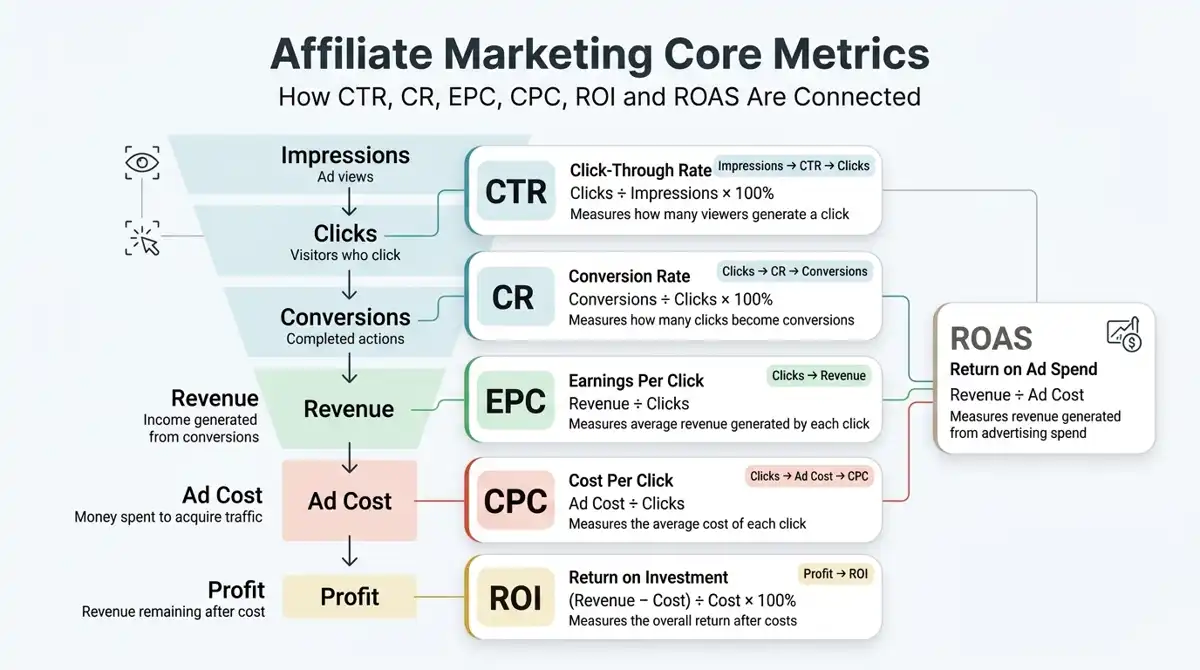
Once you understand Offers and Payouts, the next step is understanding the numbers, when you start working with Paid Traffic, many campaign decisions eventually come down to a few key metrics:
CTR, CR, EPC, CPC, CPM, ROI, and ROAS
| Term | Full Name | Meaning |
|---|---|---|
| CTR | Click-Through Rate | The percentage of impressions that result in clicks |
| CR | Conversion Rate | The percentage of clicks that result in Conversions |
| EPC | Earnings Per Click | Average revenue generated per click |
| CPC | Cost Per Click | Average cost of obtaining a click |
| CPM | Cost Per Mille | Cost per 1,000 impressions |
| ROI | Return on Investment | Return relative to the total investment |
| ROAS | Return on Ad Spend | Revenue generated relative to advertising spend |
These metrics help determine whether a campaign is performing profitably.
What Is CTR?
CTR = Click-Through Rate
CTR measures how many people click after seeing an advertisement.
The formula is:
CTR = (Clicks ÷ Impressions) × 100%
For example:
- Impressions: 10,000
- Clicks: 200
Therefore:
CTR = 200 ÷ 10,000 × 100% = 2%
CTR is often useful for evaluating whether an ad, headline, or Creative is attracting attention.
Example
Imagine you test two Creatives:
| Creative | Impressions | Clicks | CTR |
|---|---|---|---|
| A | 10,000 | 300 | 3% |
| B | 10,000 | 100 | 1% |
Creative A gets more clicks, but that does not automatically mean A is more profitable. You still need to look at what happens after the click, including CR and EPC.
What Is CR?
CR = Conversion Rate
CR measures how many clicks eventually result in a Conversion.
The formula is: CR = (Conversions ÷ Clicks) × 100%
For example:
- Clicks: 1,000
- Conversions: 30
Therefore: CR = 30 ÷ 1,000 × 100% = 3%
CTR and CR are easy for beginners to confuse.
A simple way to remember the difference is: Impression → CTR → Click → CR → Conversion
CTR mainly tells you:
How many people who saw the ad decided to click?
CR tells you:
How many people who clicked eventually completed the target action?
What Is EPC?
EPC = Earnings Per Click
EPC shows the average amount of revenue generated by each click.
The formula is: EPC = Total Earnings ÷ Total Clicks
For example:
- Revenue: $200
- Clicks: 1,000
Therefore: EPC = $200 ÷ 1,000 = $0.20
EPC is particularly useful because it connects Payout and CR into one practical metric.
Consider two Offers:
| Offer | Payout | CR | Revenue from 1,000 Clicks | EPC |
|---|---|---|---|---|
| A | $10 | 1% | $100 | $0.10 |
| B | $5 | 5% | $250 | $0.25 |
Offer A has a higher Payout, but Offer B converts much better. As a result, Offer B generates a higher EPC.
This is another reason why:
Don’t judge an Offer by Payout alone.
What Is CPC?
CPC = Cost Per Click
CPC measures how much you pay, on average, for one click.
The formula is: CPC = Ad Cost ÷ Clicks
For example:
- Ad Cost: $100
- Clicks: 1,000
Therefore: CPC = $100 ÷ 1,000 = $0.10
For Affiliates buying Paid Traffic, CPC is an important number.
If: EPC = $0.20
and: CPC = $0.10
there is theoretically room for profit based on click revenue versus click cost.
If EPC is $0.08 while CPC is $0.15, the campaign is much harder to make profitable based on those two metrics alone.
What Is CPM?
CPM = Cost Per Mille
CPM represents the cost of 1,000 ad impressions.
The formula is: CPM = Ad Cost ÷ Impressions × 1,000
For example:
- Ad Cost: $20
- Impressions: 10,000
Therefore: CPM = $20 ÷ 10,000 × 1,000 = $2
CPM is commonly used with Display, Native, and Social advertising.
What Is ROI?
ROI = Return on Investment
ROI measures the return generated from an investment after considering its cost.
The formula is: ROI = [(Revenue − Cost) ÷ Cost] × 100%
For example:
- Total Cost: $100
- Revenue: $150
Therefore: ROI = ($150 − $100) ÷ $100 × 100% = 50%
A 50% ROI means that a $100 investment generated $50 in profit.
What Is ROAS?
ROAS = Return on Ad Spend
ROAS compares advertising revenue with advertising cost.
The formula is: ROAS = Revenue ÷ Ad Cost
For example:
- Ad Cost: $100
- Revenue: $200
Therefore: ROAS = $200 ÷ $100 = 2
This can also be expressed as 200% ROAS. However, ROAS is not the same as profit margin.It only compares revenue with advertising spend, other costs have not necessarily been included.Therefore, a campaign with a good-looking ROAS is not automatically profitable.
Affiliate Marketing Math: Are You Actually Making Money?
After seeing CPA, CR, EPC, and other metrics, beginners usually want to answer one simple question:
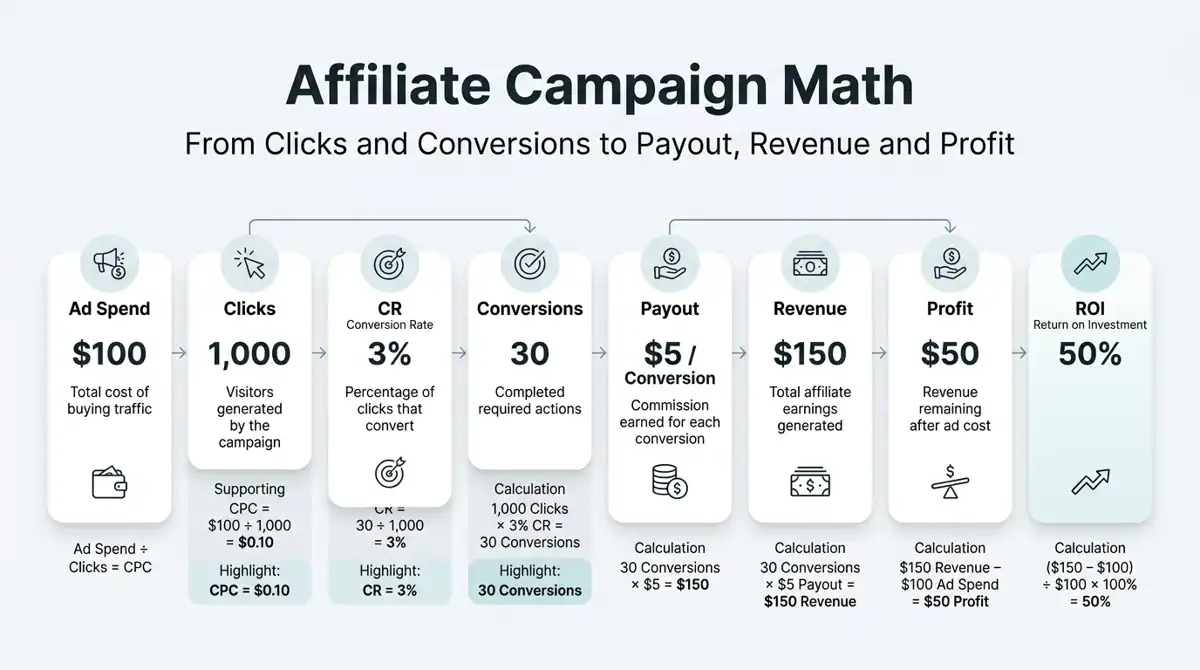
If I spend $100 on Traffic, will I make the money back?
Let’s use a simple example.
| Metric | Value |
|---|---|
| Traffic Cost | $100 |
| Clicks | 1,000 |
| CPC | $0.10 |
| CR | 3% |
| Payout | $5 |
With 1,000 clicks and a 3% CR: 1,000 × 3% = 30 Conversions
At a $5 Payout: 30 × $5 = $150 Revenue
Therefore:
Revenue = $150
Cost = $100
Profit = $150 − $100 = $50
ROI: ROI = ($150 − $100) ÷ $100 × 100% = 50%
EPC: EPC = $150 ÷ 1,000 = $0.15
CPC: CPC = $100 ÷ 1,000 = $0.10
So in this simplified example:
EPC > CPC
There is positive profit potential.
Of course, real campaigns are more complicated. You also need to consider data fluctuations, Offer Caps, Conversion approval, Traffic quality, Creative fatigue, and other costs.
Common Traffic and Media Buying Terms
Affiliate Marketing is not limited to buying advertisements.
Traffic can come from SEO, websites, social media, email, paid advertising, and other sources.
What Is Traffic?
Traffic simply refers to visitors or users sent to your destination, common Traffic types include:
| Traffic Type | Meaning |
|---|---|
| Organic Traffic | Traffic obtained without directly paying for each visit |
| Paid Traffic | Traffic purchased through advertising |
| Social Traffic | Traffic from social media platforms |
| Search Traffic | Traffic from search engines |
| Display Traffic | Traffic generated through display advertising |
| Native Traffic | Traffic from native advertising |
| Push Traffic | Traffic from Push Notification advertising |
| Pop Traffic | Traffic from Pop advertising |
| Email Traffic | Traffic generated through email marketing |
| Referral Traffic | Traffic referred from another website |
Different Offers may have very different Traffic requirements. So when applying for an Offer, do not only check the Payout. Check which Traffic types are allowed.
What Is a Traffic Source?
A Traffic Source is the platform or source from which your Traffic comes, for example, if you buy advertising through a platform, that advertising platform is your Traffic Source.
Different Traffic Sources can have different:
- User quality
- Traffic costs
- Ad formats
- Targeting options
- Rules and restrictions
These differences can have a significant impact on campaign performance.
What Is Media Buying?
Media Buying can be simply understood as purchasing advertising Traffic, a Media Buyer purchases Traffic from an advertising platform and sends users toward a Landing Page or Affiliate Offer.
A simplified process looks like this:
Media Buyer → Paid Traffic → Ad / Creative → Landing Page → Affiliate Offer → Conversion → Revenue
Common Traffic Sources can include:
- Google Ads
- Meta Ads
- TikTok Ads
- Native Ad Networks
- Push Ad Networks
The goal of Media Buying is not simply to purchase as much Traffic as possible, the real objective is to acquire enough qualified Conversions at a cost that allows the campaign to remain profitable.
What Is a Media Buyer?
A Media Buyer is responsible for purchasing and optimizing advertising Traffic, depending on the campaign, a Media Buyer may analyze:
- CTR
- CPC
- CPM
- CR
- EPC
- ROI
- ROAS
- GEO
- Creative
- Placement
- Campaign performance
Affiliate Marketing and Media Buying are often closely connected. However: Doing Affiliate Marketing does not mean you must do Media Buying, many Affiliates rely on SEO, content websites, Pinterest, YouTube, and other forms of organic Traffic.
What Is GEO?
In Affiliate Marketing and Media Buying, GEO usually refers to the target country or region. Examples include:
| GEO | Country |
|---|---|
| US | United States |
| UK | United Kingdom |
| CA | Canada |
| AU | Australia |
| DE | Germany |
| FR | France |
| IT | Italy |
| ES | Spain |
| BR | Brazil |
| IN | India |
Traffic costs, user behavior, and Conversion Rates can vary significantly between GEOs, an Offer that performs well in the US does not necessarily perform equally well in another country.
Tier 1, Tier 2, and Tier 3
Affiliate marketers often use Tier 1, Tier 2, and Tier 3 to roughly categorize countries.
Tier 1 commonly includes mature markets such as the US, UK, Canada, and Australia.
Tier 2 and Tier 3 generally refer to other markets.
However, there is no universal official Tier classification, different Affiliate Networks and Traffic Sources may categorize countries differently, so when an Offer is labeled Tier 1, Tier 2, or Tier 3, check the definition used by the specific platform.
What Is a Vertical?
A Vertical refers to the industry or business category of an Affiliate Offer. Common Verticals include:
| Vertical | Examples |
|---|---|
| E-commerce | Online shopping |
| Finance | Financial services |
| Insurance | Insurance products |
| Dating | Dating services |
| Gaming | Games |
| Mobile Apps | Mobile applications |
| Software | Software and SaaS |
| Education | Courses and education services |
| Health | Health-related products and services |
| Sweepstakes | Sweepstakes Offers |
| Lead Generation | Lead acquisition |
| Subscription | Subscription services |
| MVAS | Mobile Value-Added Services |
Different Verticals can have very different user behavior, Payouts, Traffic costs, and promotional restrictions.
What Is a Landing Page?
A Landing Page is a page users reach after clicking an advertisement or promotional link, a common Affiliate structure is:
Advertisement → Landing Page → Affiliate Offer → Conversion
A Landing Page may explain a product, introduce a service, provide information, or guide users toward the next step, however, not every campaign needs a Landing Page. Some Affiliates send Traffic directly to the Offer. This is commonly called Direct Linking.
What Is a Prelander?
A Prelander is a page placed between the advertisement and the Landing Page or Offer, a common structure is:
Advertisement → Prelander → Landing Page / Offer → Conversion
A Prelander may be used to:
- Warm up users
- Provide additional information
- Filter Traffic
- Build interest
- Encourage another click
However, adding another page also adds another step to the funnel, whether you should use a Prelander depends on the Offer, Traffic Source, and actual campaign data.
Prelander vs Landing Page
| Prelander | Landing Page | |
|---|---|---|
| Position | Usually before the Landing Page / Offer | Closer to the final Conversion |
| Main Purpose | Warm up, filter, build interest | Explain the product/service and encourage Conversion |
| Content | Stories, articles, quizzes, recommendations | More direct product/service information and CTA |
| Distance from Offer | Further away | Closer |
| Required? | Not always | Not always |
Typical structures include: Ad → Prelander → LP / Offer
or: Ad → LP → Offer
For example, instead of sending a user directly to a product page, an Affiliate might first show an editorial-style Prelander explaining a particular topic.
The user then clicks through to a Landing Page, which provides more direct information and a CTA, before reaching the Affiliate Offer.
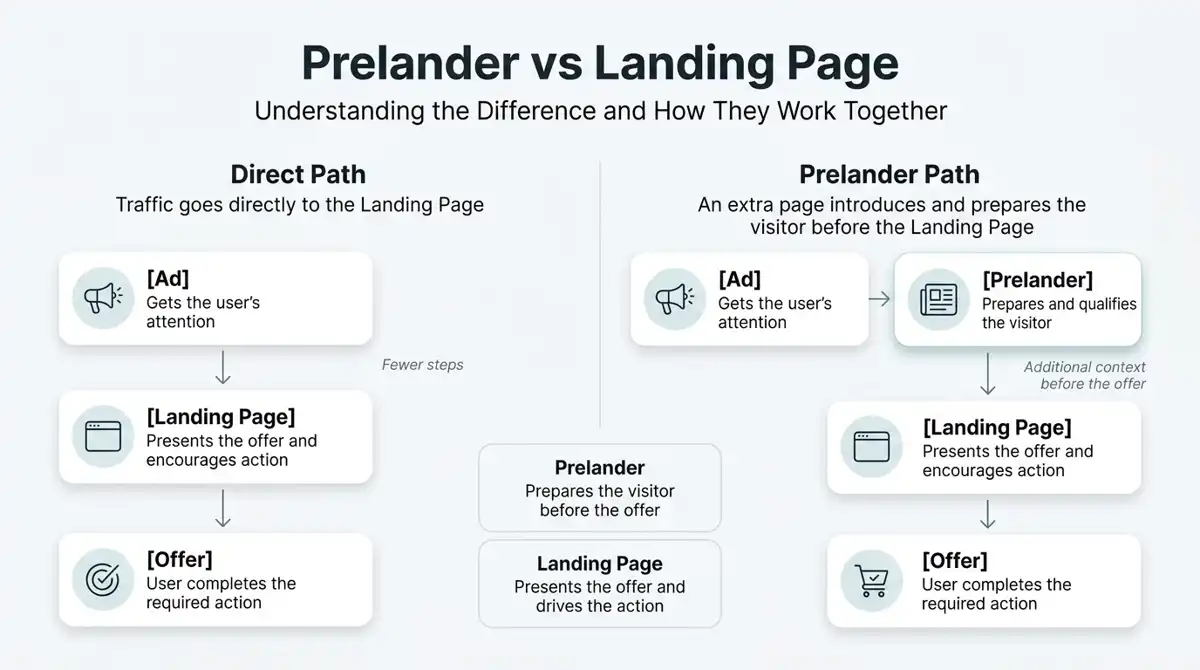
A Prelander can add context and help prepare the user, but it also introduces an additional step. The data should ultimately determine whether that extra step is useful.
What Is a Creative?
In Paid Traffic, a Creative generally refers to the advertising material used to attract users.
Examples include:
- Image ads
- Video ads
- Ad headlines
- Ad copy
- UGC videos
- Banners
For example:
“This simple morning habit may help support weight management.”
Or:
“5 Morning Habits That May Support a Healthier Lifestyle”
The Creative can have a direct impact on CTR, however, just like with the earlier examples, CTR is not the only metric that matters.
Consider two Creatives:
| Creative | CTR | CR | EPC |
|---|---|---|---|
| A | 3.5% | 1.8% | $0.12 |
| B | 2.1% | 4.2% | $0.25 |
Creative A gets more clicks, but Creative B has a higher CR and EPC. So if you only look at CTR, you may incorrectly conclude that Creative A is better.
What Is a Placement?
A Placement is the specific location where an advertisement is displayed, an ad might appear on:
- A website
- An app
- A social feed
- Search results
- Video content
Different Placements can have different Traffic quality and costs. this is why Media Buyers often compare Placement-level performance when optimizing campaigns.
Cap, Hold, and Fraud
The previous sections focused mainly on how Affiliate Marketing generates revenue, now we need to look at another important part of Affiliate Marketing:
Why isn’t every Conversion immediately treated as final revenue?
What Is a Cap?
A Cap is the maximum number of Conversions an Offer can accept during a specific period.
For example:
Daily Cap: 100
This usually means the Offer can accept up to 100 Conversions per day, caps can be daily, hourly, or based on other periods. If an Offer reaches its Cap and you continue buying large amounts of Traffic without noticing, some of that Traffic may no longer be useful for the Offer.
So once a campaign starts generating consistent Conversions, you should pay attention to its Cap.
What Is Hold?
Hold refers to the period during which Conversions remain pending before final approval.
For example, an Offer may have a 7-day Hold, a user generates a Conversion today, but that Conversion may not become finally approved today. During the Hold period, the Conversion may be reviewed for:
- Fraud
- Quality
- Refunds
- Other compliance issues
So when you see a large number of Pending Conversions in your dashboard, do not immediately treat all of them as money that has already been earned.
What Is Fraud?
Fraud refers to fraudulent or invalid Traffic and Conversions. Examples can include:
- Fake clicks
- Bot Traffic
- Duplicate Conversions
- Malicious registrations
- Fake user information
- Promotional methods that violate Offer rules
Affiliate Networks and Advertisers commonly perform Traffic quality checks, a large amount of invalid Traffic can result in rejected Conversions and may also affect the status of an Affiliate account.
Incentive vs Non-Incentive Traffic
Incentive Traffic means users receive a reward for completing a specified action.
For example:
A user receives points or another reward after completing a registration.
Not every Offer allows Incentive Traffic. If an Offer specifically prohibits Incentive Traffic, you should not use it. Non-Incentive Traffic means users are not given an external reward for completing the Conversion.
The important point is: A Traffic method generating Conversions does not automatically mean that the method is allowed.
Always check the Offer’s Traffic restrictions.
What Are Smartlinks and Auto-Optimization?
If you work with multiple Offers, you may encounter Smartlinks, a Smartlink can be understood as a link that automatically distributes users among different Offers.
Once you start running multiple Offers and Traffic Sources, tracking becomes increasingly important. You may also want to compare self-hosted and cloud-based Affiliate Trackers to understand the differences in cost, data control, and scalability.
The system may use factors such as:
- GEO
- Device
- Carrier
- Historical performance
- Other available conditions
A simplified structure is:
Traffic → Smartlink → Offer A / Offer B / Offer C → Conversion
This can reduce the amount of manual work required to manage multiple Offers.
Auto-Optimization
Auto-Optimization refers to a system automatically adjusting Traffic distribution based on historical performance.
For example:
- Offer A performs better with US Android users.
- Offer B performs better with US iPhone users.
A system may use existing data to distribute Traffic accordingly. However, Smartlinks do not make prohibited Traffic acceptable, if Traffic violates the Offer or Network’s rules, using a Smartlink does not bypass those restrictions.
What Is Brand Bidding?
Brand Bidding refers to bidding on a brand name or brand-related keyword in search advertising.
For example, an Affiliate may promote an Offer associated with a well-known brand and use that brand’s name as a Google Ads keyword.
- Whether this is allowed depends on the Advertiser or Affiliate Network.
- Some Offers explicitly prohibit bidding on brand terms.
So even if Brand Bidding can generate Conversions, it does not mean the method is permitted.
Always check the Offer’s restrictions before using it.
More Common Affiliate Marketing Terms
Once you start using Affiliate Networks or advertising platforms, you will encounter many other terms.
| Term | Meaning |
|---|---|
| Campaign | A specific advertising campaign |
| Ad | A specific advertisement |
| Creative | The advertising material |
| Impression | One ad impression |
| Click | One user click |
| Conversion | A completed target action |
| Lead | A valid potential customer |
| Revenue | Income generated |
| Profit | Revenue after costs |
| Cost | Promotional or advertising expenses |
| Commission | Money earned by the Affiliate |
| Approved Conversion | A Conversion confirmed as valid |
| Pending Conversion | A Conversion still under review |
| Rejected Conversion | A Conversion that has been rejected |
| Refund | Money returned to the customer |
| Chargeback | A disputed transaction resulting in a deduction |
| Restriction | A rule limiting how an Offer can be promoted |
| Allowed Traffic | Traffic types permitted by the Offer |
| Prohibited Traffic | Traffic types not permitted by the Offer |
| Compliance | Following the applicable promotional rules |
| Sub-Affiliate | An Affiliate operating under another Affiliate |
| Smartlink | A link that automatically distributes Traffic among Offers |
Offer vs Campaign: What’s the Difference?
One concept that often confuses beginners is the difference between an Offer and a Campaign.
A simple way to understand it is:
Offer = What you are promoting
Campaign = How you are promoting it
Think of the Offer as the product or promotion provided by the Advertiser, the Campaign is the specific promotional activity you create around that Offer. For example:
| Concept | Example |
|---|---|
| Offer | US App Install, Payout $3 |
| Campaign | Facebook US Android App Install |
| Creative | Video A, Image B |
| Traffic | Facebook Ads |
| Conversion | User installs the app |
| Payout | $3 per valid Conversion |
Suppose an Affiliate Network gives you this Offer:
Offer: MobileGameInstall
GEO: US
Payout: $2
Conversion: FirstInstall
You decide to promote it using paid advertising.
You might create:
Campaign 1: US Android Game
GEO: US
Device: Android
Creative: Video A
Daily Budget: $50
Later, you might want to test iPhone users:
Campaign 2: US iOS Game
GEO: US
Device: iOS
Creative: Video B
Daily Budget: $50
Both campaigns are promoting the same Offer, the difference is the way you are testing and buying Traffic. So the easiest way to remember it is:
Offer = What to promote
Campaign = How to promote it
15 Affiliate Marketing Terms Beginners Should Learn First
You do not need to memorize every Affiliate Marketing term at once.
Start with these core concepts:
- Affiliate
- Advertiser
- Affiliate Network
- Offer
- Conversion
- Payout
- CPA
- CPL
- CR
- CTR
- EPC
- CPC
- Traffic
- GEO
- ROI / Profit
Once these concepts are connected, topics such as Landing Pages, Prelanders, Media Buying, Smartlinks, and Trackers become much easier to understand.
A Practical Example: Understanding an Offer
Let’s put everything together with a simple Affiliate Network example.
Imagine you see this Offer:
Offer: MobileSubscription
GEO: US
Payout: $8
Conversion: Subscription
CR: 3%
Daily Cap: 100
Traffic: Social / Native
You can immediately understand several things:
- The Offer targets the US.
- The required Conversion is a Subscription.
- Each valid Conversion pays $8.
- The assumed CR is 3%.
- The Offer has a Daily Cap of 100 Conversions.
- Social and Native Traffic are allowed.
Now suppose you generate 1,000 Clicks.
At a 3% CR: 1,000 × 3% = 30 Conversions
Revenue: 30 × $8 = $240
If your Traffic costs $150: Profit = $240 − $150 = $90
ROI: ROI = ($240 − $150) ÷ $150 × 100% = 60%
EPC: EPC = $240 ÷ 1,000 = $0.24
CPC: CPC = $150 ÷ 1,000 = $0.15
Therefore: EPC $0.24 > CPC $0.15
In this simplified example, the campaign has positive profit potential. But there is another important detail: The Daily Cap is 100.
If you have already generated 100 valid Conversions that day, you cannot simply assume you can continue buying Traffic at the same scale. This is why Affiliate Marketing cannot be evaluated using a single number, you need to look at the entire chain:
Traffic → CPC → CR → Conversion → Payout → Revenue → Profit
Final Thoughts
Affiliate Marketing terminology can look complicated at first, but most of the terms revolve around a few simple questions:
What are you promoting?
That’s the Offer.
What does the user need to do?
That’s the Conversion.
How much do you earn from one Conversion?
That’s the Payout.
How many clicks become Conversions?
That’s the CR.
How much does each click earn on average?
That’s the EPC.
How much does each click cost?
That’s the CPC.
Are you actually making money?
That’s where Profit and ROI come in.
Once these concepts are connected, terms such as CPA, CPL, CPS, CPI, GEO, Traffic, Media Buying, Landing Page, and Smartlink no longer seem like a collection of random abbreviations.
The important thing is not memorizing every acronym, it is understanding the relationship between Traffic, Conversion, Revenue, and Cost.
For someone just getting started, the best place to begin is with:
Offer → Conversion → Payout → CPA / CPL → CR → EPC → CPC → Traffic
From there, you can gradually move into Traffic Sources, Paid Traffic, Media Buying, Landing Pages, Tracking, and campaign optimization.
Note: The exact definitions, Traffic restrictions, approval rules, Caps, Payouts, and other conditions can vary between Affiliate Networks and Advertisers. Always follow the current rules published for the specific Offer you are promoting.
If you are ready to go deeper into Affiliate Tracking, the next step is understanding how a Tracker connects Traffic, Clicks, Conversions, and Campaign data. If you’re new to Binom, our complete Binom configuration guide for beginners walks through the basic setup, server requirements, installation process, and some common configuration considerations.