When building content or niche sites, it’s easy to fall into the trap of “scaling at all costs.”
When I first launched my online mini-game site, foyoy.com, that was my exact playbook. Looking back, it was a classic rookie mistake that cost me over six months in the Google sandbox. This week, though, my Google Search Console data finally showed real progress.
Here is the full breakdown of how I got hit with a site-wide penalty, what I did to fix it, and the lessons learned along the way.
The Mistake: 800+ Pages from “Instant Indexing” to “Homepage Only”
At launch, my growth strategy was aggressive and simple:
- Bulk-import 100 online mini-games.
- Translate the site into 8 different languages using automated machine translation to capture global traffic.
Overnight, the site ballooned to over 800 pages.
At first, the metrics looked amazing. Googlebot crawled the site aggressively and indexed almost everything. I thought I had cracked the code to programmatic multilingual SEO.
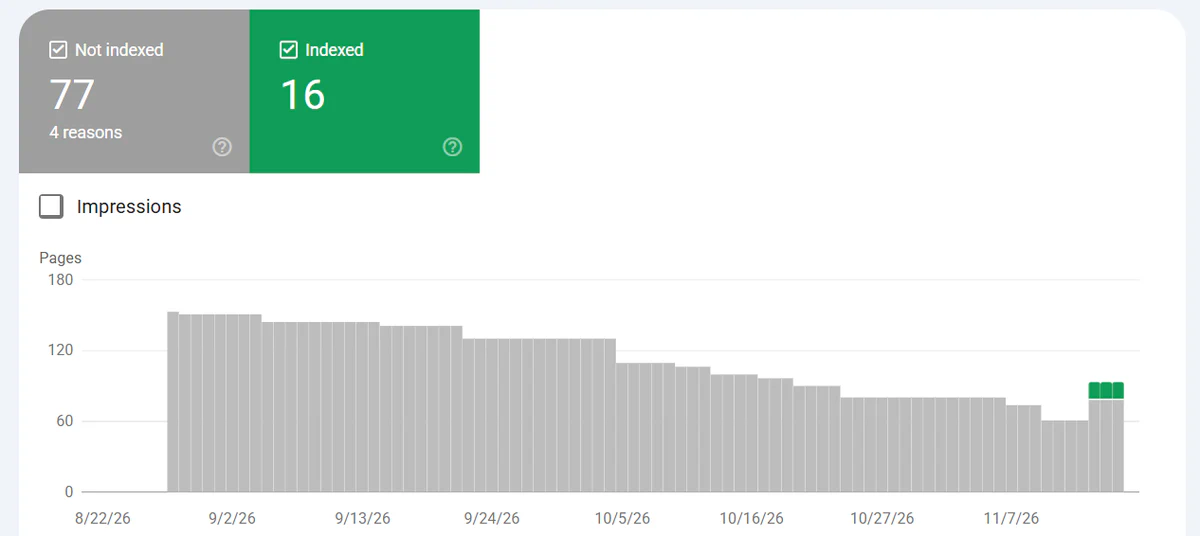
The honeymoon didn’t last long. Within a few weeks, my index count fell off a cliff. Google deindexed virtually every inner page. When I ran a site:foyoy.com search, only the homepage remained.
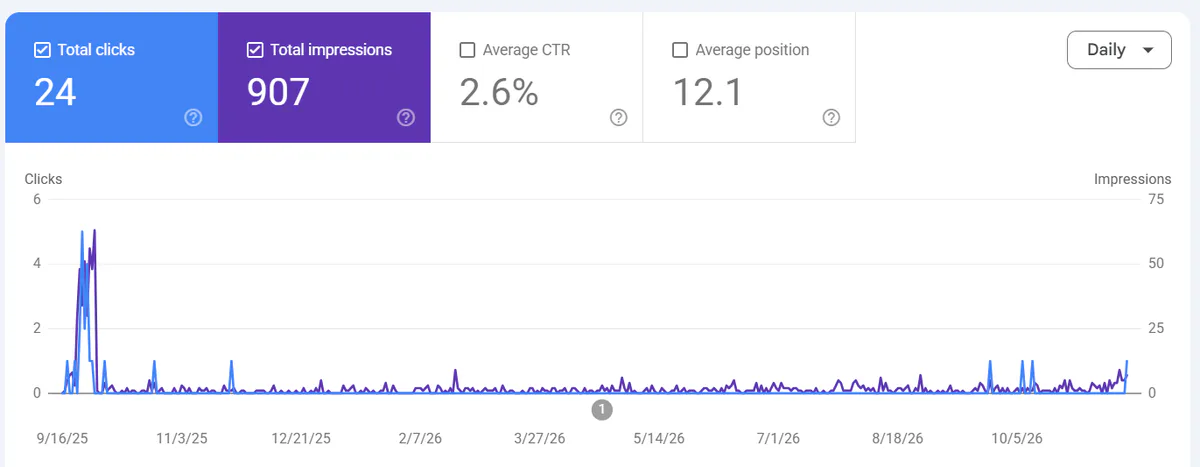
I had triggered a classic site-wide quality penalty.
The Diagnosis: What Went Wrong?
Stepping back to analyze the damage, it was clear that I had tripped two major wires in Google’s Helpful Content System and Spam Updates:
- Severe thin content. Mini-game sites are naturally interactive-heavy and text-light. When a page only consists of a game iframe and a one-sentence description, all 100 pages look like near-duplicate empty shells to a search engine.
- The scaled content abuse effect. 100 thin pages × 8 languages = 800+ low-value pages. Unedited machine translations often read poorly to native speakers. Google viewed this as an attempt to manipulate rankings using automated, low-quality content. Under current algorithms, if a large percentage of your site is low-quality, Google won’t just ignore those pages—it will tank your entire domain’s trust score.
The Fix: Aggressive Pruning + Manual Value
Once the root cause was clear, the recovery plan became obvious: 100 genuinely useful pages are infinitely better than 800 spammy ones. I decided to perform major surgery on the site.


Step 1: Ruthless Content Pruning
I cut all 7 translated languages and reverted to an English-only site. Deleting over 700 auto-translated pages instantly dropped my site-wide low-quality ratio and allowed Googlebot to focus its crawl budget strictly on my core URLs.
Step 2: Rewriting Every Single Page from Scratch
Deleting bad pages wasn’t enough; the remaining 100 English pages needed real information gain. I manually rewrote the content for all 100 games. Before, most pages had little more than a one-sentence description and the game iframe. After the rewrite, each page included:
- Engaging game overviews and background context
- Clear, step-by-step How to Play instructions and control breakdowns
- Actionable Tips & Tricks to help players beat levels or get high scores
The goal was simple: prove to both users and search engines that every URL on my domain is a helpful, standalone resource—not a mass-produced template.
The Recovery: Surviving a 6-Month Sandbox
After deploying the overhaul, the hardest part began: waiting.
Google is notoriously slow to forgive domains with a history of spammy signals. For over six months, my GSC indexing graph was completely flat. Only the homepage stayed indexed. Honestly, there were moments I wondered if the domain was permanently burned.
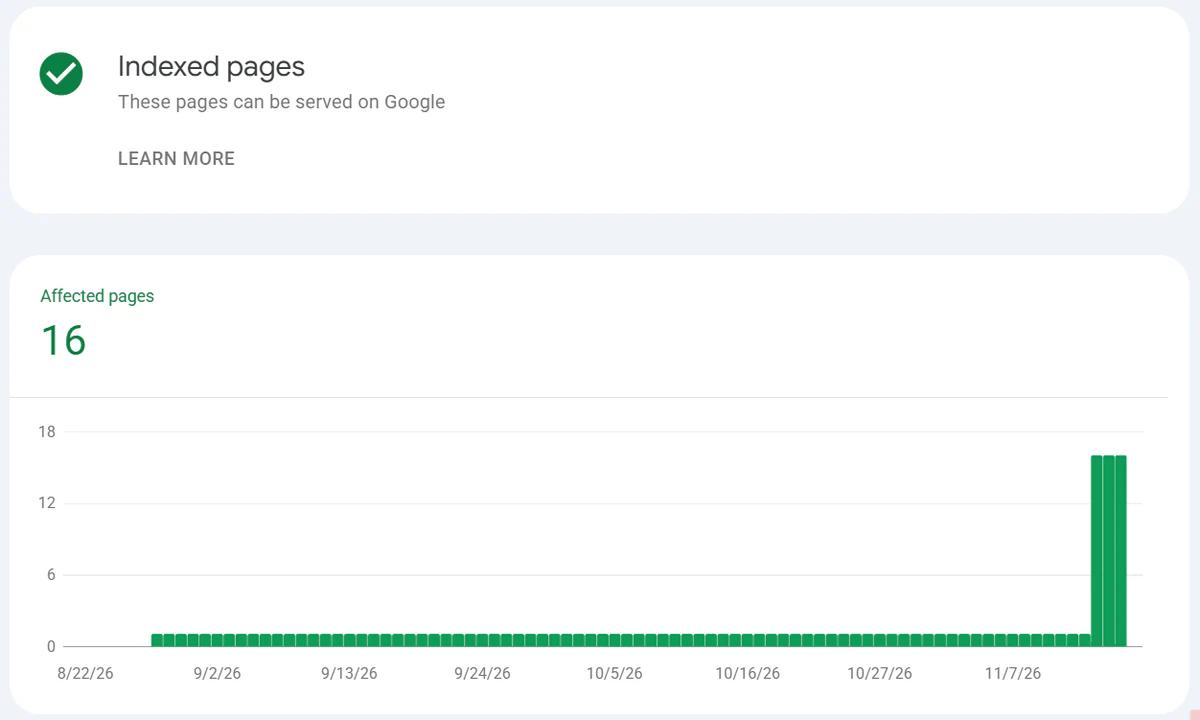
Then, just recently, I checked GSC and saw the breakthrough: 15 additional pages had been indexed, bringing the total to 16 (homepage + 15 new ones).
While 15 new pages is still a modest start, for a domain that was completely de-indexed for half a year, it’s a meaningful signal:
- The site-wide suppression appears to be lifting. Google has re-evaluated the domain’s quality and started letting pages back into the index.
- The strategy works. Cutting machine translations and investing in unique, helpful content is the right path. As Googlebot continues to recrawl the site, more of the remaining pages should gradually follow.
Three Takeaways for Indie Hackers & Site Builders
This six-month detour taught me a hard truth about modern SEO: Google strictly prioritizes quality over volume.
- Avoid scaled auto-translation. Unless you have the resources to properly localize and proofread your content, spinning up multiple languages with raw machine translation can poison your main domain. Master one language (like English) first.
- Don’t leave functional sites text-starved. Whether you’re building a game portal, a micro-tool, or a directory, working functionality isn’t enough for SEO. You need unique, descriptive text (guides, use cases, tips, FAQs) so search engines understand the value of the page.
- Recovery takes patience. If your site gets hit by a site-wide algorithmic penalty, cleaning it up is only half the battle. Expect a 3 to 6+ month waiting period (often tied to core algorithm updates) for Google to restore trust.
If you’re sitting on a penalized or unindexed site right now, try cutting the dead weight and doubling down on the quality of your core pages. Sometimes, slowing down is the fastest way to grow.