In today’s digital-first world, a website is an indispensable platform for businesses, organizations, and individuals to showcase their identity, offer services, and engage with their audience. At the very foundation of this digital structure lies the domain name. Far more than just an address for users to find a website, a domain is a critical element that intertwines with brand identity, user experience, and even search engine optimization. This article explores the profound connection between a domain name and the intricate process of website construction.
1. How Do Domains Affect Brand Image and User Memory?

The domain name is often the very first point of contact a user has with your brand online. A well-chosen domain can significantly enhance brand perception and memorability in several key ways:
- First Impressions and Professionalism: A clean, professional domain that aligns with your brand name instantly builds trust and credibility. For example,
apple.comormicrosoft.comconvey an immediate sense of authority and authenticity. Conversely, a long, convoluted domain filled with hyphens or irrelevant words can make a business appear amateurish or untrustworthy. - Brand Reinforcement and Identity: Your domain is the cornerstone of your online brand identity. When the domain matches the brand name, it creates a cohesive and unified presence across both online and offline marketing channels. Every time a user types or sees the domain, it reinforces the brand name, making it more recognizable and memorable. A unique and creative domain can even become a talking point, contributing to the brand’s story.
- Memorability and Word-of-Mouth: A domain that is short, easy to spell, and simple to pronounce is more likely to be remembered by users, driving direct traffic. An intuitive domain name also facilitates word-of-mouth marketing. When a customer recommends your site to a friend, a simple, memorable domain lowers the barrier to a successful referral.
- Setting User Expectations: A domain can effectively signal the nature of the website’s content. For instance, a domain containing “gallery” suggests a portfolio, while one with “solutions” implies a B2B service. This helps in managing user expectations before they even visit the site, attracting a more relevant and targeted audience.
2. Domains and SEO (Search Engine Optimization): Choosing an SEO-Friendly Domain
A domain’s impact extends beyond human users; it also plays a crucial role in how search engines like Google perceive and rank your website. An SEO-friendly domain lays a strong foundation for long-term optimization success.
- Brandability Over Keywords: In the past, exact-match domains (EMDs) that contained specific keywords (e.g.,
buy-cheap-laptops-online.com) were highly valued. However, modern search engine algorithms prioritize brand signals. A unique, brandable domain likeamazon.comorspotify.comis now considered far more valuable. It appears more credible to both users and search engines and is less likely to be flagged as spammy. - Keep It Short and Simple: Shorter domains are easier for users to remember and type, leading to a better user experience—a factor that search engines value. It’s also advisable to avoid using numbers and hyphens. Hyphens can be a signal of spammy behavior, and numbers can create confusion (e.g., “5” vs. “five”).
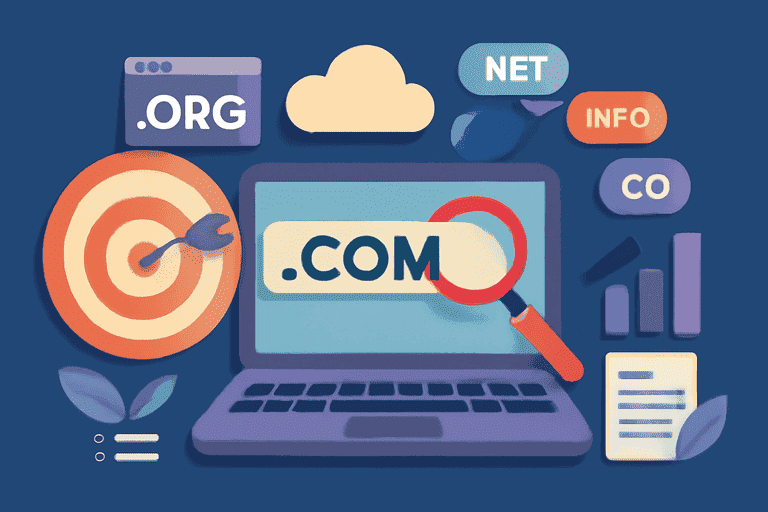
- Choosing the Right Top-Level Domain (TLD): The TLD is the extension at the end of your domain, such as
.com,.org, or.net. For businesses,.comis almost always the best choice due to its high level of recognition and trust among users worldwide. While newer TLDs like.appor.storecan be relevant for specific niches,.comcarries an inherent authority that can be beneficial for SEO. - Future-Proofing: Choose a domain that allows your business to grow. A name that is too narrow (e.g.,
shutter-repair-boston.com) can be limiting if you decide to expand your services or locations in the future. A broader, brandable name offers more flexibility.
3. The Clever Use of Subdomains: Building Blogs, Forums, or Multilingual Sites
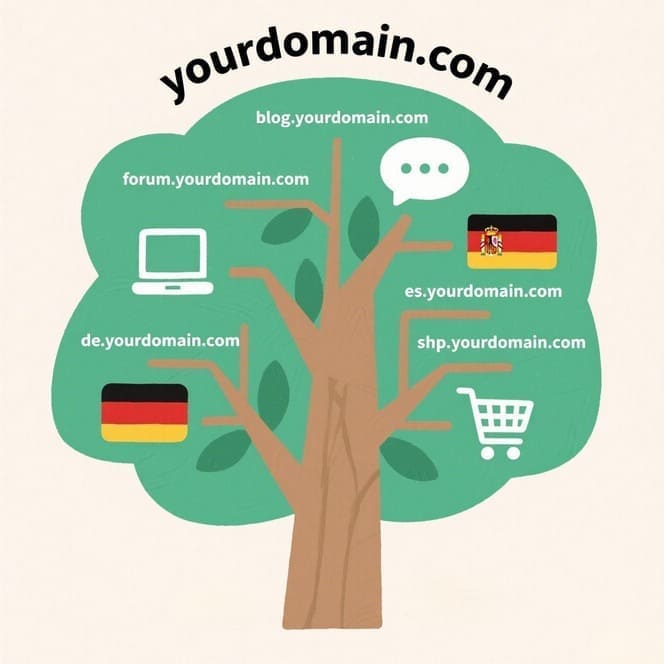
A subdomain is a prefix added to your main domain, creating a separate section of your website (e.g., blog.example.com). It functions like a distinct site while still being connected to the primary domain. This structure is incredibly useful for organizing large websites and creating dedicated user experiences.
- Content Segmentation:
- Blogs: Placing a blog on
blog.yourdomain.comallows you to create a content hub that is distinct from your main corporate site. This can have a different layout, theme, and focus entirely on content marketing and community engagement. - Forums & Communities: For building a user community, a subdomain like
forum.yourdomain.comorcommunity.yourdomain.comprovides a dedicated space for discussion and interaction, which can be run on separate software from the main site. - E-commerce Stores: If your primary site is content-focused, you can host your retail operations on
shop.yourdomain.comto create a streamlined and dedicated shopping experience.
- Blogs: Placing a blog on
- Multilingual and International Sites: For businesses targeting different regions or languages, subdomains are an effective strategy for international SEO.
en.yourdomain.comfor Englishes.yourdomain.comfor Spanishde.yourdomain.comfor German
From an SEO perspective, search engines often treat a subdomain as a separate entity from the root domain. This means it needs to build its own authority and rankings. The choice between a subdomain (blog.domain.com) and a subfolder (domain.com/blog) depends on your strategy. If you want the content to be closely associated with and contribute directly to the root domain’s authority, a subfolder is often preferred. If you want to create a more distinct separation of content or brand, a subdomain is the better choice.
4. Domain Redirection (301 vs. 302): Essential Knowledge for Redesigns and Domain Changes
In the life cycle of a website, change is inevitable. Whether you’re redesigning your site, migrating content, or changing your domain name entirely, redirects are the technical mechanism that ensures a seamless transition for users and preserves your hard-earned SEO value. The two primary types are 301 and 302 redirects.
- 301 Redirect: Moved Permanently
- What it is: A 301 status code informs browsers and search engines that a page has been permanently moved to a new location.
- When to use it: This is the most critical and common type of redirect for SEO.
- Changing Domains: When migrating from
olddomain.comtonewdomain.com, you must implement a 301 redirect from every page on the old site to the corresponding page on the new site. - Changing URL Structures: During a website redesign, URLs might change (e.g., from
site.com/page.htmltosite.com/new-page). - HTTP to HTTPS Migration: To secure your site, you must permanently redirect all
http://traffic tohttps://.
- Changing Domains: When migrating from
- SEO Impact: The primary benefit of a 301 redirect is that it passes the vast majority (90-99%) of the “link equity” (ranking power) from the old URL to the new one. This is essential for preserving your search engine rankings after a major change.
- 302 Redirect: Found / Moved Temporarily
- What it is: A 302 status code indicates that a page is temporarily located at a different address, but it will return to the original URL in the future.
- When to use it:
- A/B Testing: You might temporarily redirect a portion of your users to a new page design to test its performance.
- Website Maintenance: When your site is down for short-term maintenance, you can temporarily redirect users to a notice page.
- Device or Location-Specific Content: Temporarily directing mobile users to a mobile-specific version of a page.
- SEO Impact: Because the move is temporary, search engines do not pass link equity from the original URL to the temporary one. The original URL retains its ranking value. Using a 302 redirect for a permanent move is a major SEO mistake, as the new page will not inherit the authority of the old one, potentially leading to a catastrophic loss of traffic.
In conclusion, a domain name is a strategic asset, not a mere technicality. It is the address of your digital home, a key driver of your brand’s perception, and a foundational element of your SEO strategy. From the initial choice of a name to the clever use of subdomains and the technical mastery of redirects, every decision related to your domain has a lasting impact on the success of your website. Understanding and leveraging this intimate relationship is paramount for building a powerful and enduring online presence.