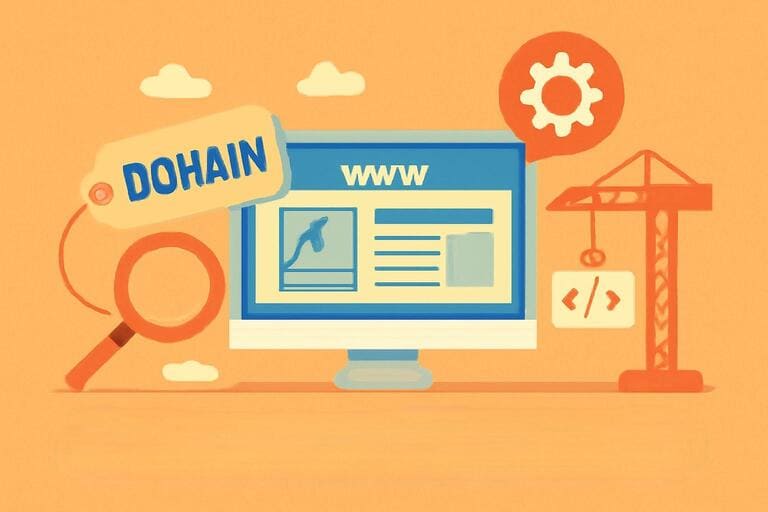
In the vast digital universe, we interact with countless websites every day. Whether we’re reading the news, scrolling through social media, or shopping online, we rely on a key element: the domain name. But is a domain just the string of characters we type into our browser’s address bar? Far from it. It is the cornerstone of an online identity, a bridge connecting people to digital information, and the core of an elegant global addressing system.
This article will guide you through the world of domain names, from intuitive analogies and their internal structure to their inseparable relationship with the foundation of the web—the IP address.
1. The Analogy: A Domain’s “Street Address” and “Phone Number”
To understand the essence of a domain name, we can compare it to two things from our daily lives: a street address and a phone number.
The Street Address (IP Address): Every server on the internet (the computer that stores a website’s files) has a unique numerical identifier called an IP (Internet Protocol) address, such as 172.217.160.142. This is like the precise geographic coordinates of a house—complex and difficult to remember. Imagine trying to visit a friend if all you had was a long string of latitude and longitude coordinates. It would be incredibly inconvenient.
The Phone Number (Domain Name): A domain name, like google.com, is like a contact’s name in your phone’s address book. You don’t need to memorize your friend’s complex phone number; you just search for their name and tap to call. Similarly, you don’t need to remember the long string of numbers for Google’s server. You simply type google.com into your browser to visit the site.
Therefore, a domain name is a human-friendly alias for a computer-friendly IP address. It translates complex machine language (numerical IPs) into something we can easily recognize and recall (words), serving as our convenient gateway to the internet.
2. The Anatomy of a Domain: TLD, SLD, and Subdomain
A seemingly simple domain name has a clear, hierarchical structure. It is composed of several parts, separated by dots (“.”). Reading from right to left, we can break it down into three main components:
- Top-Level Domain (TLD): This is the rightmost part of the domain name and represents the highest level in the domain hierarchy.
- Generic Top-Level Domains (gTLDs): These include well-known extensions like
.com(commercial),.org(organization),.net(network),.edu(education), and.gov(government). In recent years, many new gTLDs have been introduced, such as.app,.shop, and.blog, offering more diverse and specific options. - Country-Code Top-Level Domains (ccTLDs): These are two-letter extensions representing specific countries or territories, such as
.cn(China),.jp(Japan), and.us(United States).
- Generic Top-Level Domains (gTLDs): These include well-known extensions like
- Second-Level Domain (SLD): Located to the left of the TLD, the SLD is the core of the domain’s identity. This is the part that users typically customize when they register a domain, representing their brand, company name, or website topic. In
google.com,googleis the second-level domain. It must be unique within its TLD; once registered, no one else can use the same SLD and TLD combination. - Subdomain: This is an optional part to the left of the second-level domain. It functions like a division or department of the main website, used to organize and partition different sections. The most common subdomain is
www, which stands for “World Wide Web.” Other examples includemail.google.com(for email services) orblog.example.com(for a blog section). Website owners can create multiple subdomains as needed.
Let’s break down www.oddbbo.com:
.comis the Top-Level Domainoddbbois the Second-Level Domainwwwis the Subdomain
3. Domains and IP Addresses: How DNS Works
We now know that a domain name is a nickname for an IP address. But how does your computer find the correct IP address when you type a domain into your browser? This magical translation process is handled by the Domain Name System (DNS). Think of DNS as the internet’s phone book.
The entire query process, also known as DNS resolution, can be broken down into the following steps:
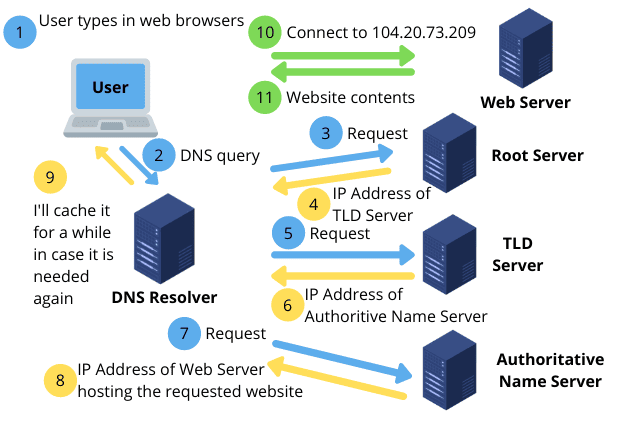
- User Makes a Request: You type
www.google.cominto your browser and press Enter. The browser first checks its own cache to see if it already has a record for this domain. If so, it uses it directly. If not, it asks the operating system for help. - Querying the Recursive DNS Server: Your computer sends a query to a Recursive DNS Server (also called a DNS resolver), which is typically operated by your Internet Service Provider (ISP). The query asks, “What is the IP address for
www.google.com?” - The Recursive Server’s Chain of Queries: The recursive server acts like a helpful librarian, taking on the task of finding the answer. It initiates a series of queries, starting from the “root”:
- First Stop: Root Nameserver: The recursive server asks a root server, “Who is responsible for the
.comTLD?” The root server doesn’t know the IP forwww.google.com, but it knows who to ask next. It replies, “I don’t know, but you can ask the TLD server for.com, whose address is XXX.” - Second Stop: TLD Nameserver: The recursive server then asks the
.comTLD nameserver, “Where is the authoritative nameserver forgoogle.com?” The TLD server also doesn’t have the final answer, but it provides the next clue: “I don’t know the IP forwww.google.com, but the authoritative nameserver forgoogle.comis at address YYY.” - Third Stop: Authoritative Nameserver: Finally, the recursive server contacts the Authoritative Nameserver for
google.com. This server is the “official” source for the domain and holds the definitive records. Upon receiving the request, it checks its records, finds the IP address172.217.160.142associated withwww.google.com, and sends this answer back to the recursive server.
- First Stop: Root Nameserver: The recursive server asks a root server, “Who is responsible for the
- Returning the Result and Caching: The recursive DNS server now has the IP address. It immediately sends it back to your computer. To improve efficiency, it also caches (stores) this domain-to-IP mapping for a set period. This way, if another user queries the same domain before the cache expires, the server can provide the answer instantly without repeating the entire lookup process.
- Browser Access: Once your computer receives the IP address, your browser can send a request directly to the server at
172.217.160.142to fetch the webpage content and display it for you.
4. Why Do We Need Domains Instead of Just IP Addresses?
After understanding the process above, the answer becomes clear. We rely on domain names instead of IP addresses for several crucial reasons:
- Easy to Remember and Use: This is the most important reason.
amazon.comis far easier for the human brain to remember and type than a string of numbers like205.251.242.103. Domains dramatically lower the barrier to using the internet. - Branding and Identity: A good domain name is a brand asset. It can concisely and intuitively reflect the nature of a website or the identity of its owner, helping to build user trust and brand recognition.
- Flexibility and Stability: A website’s server might change its IP address due to maintenance, upgrades, or switching hosting providers. If users relied on IP addresses, every change would be a disaster, requiring all users to be notified of the new address. With a domain, however, the IP address behind it can change without any disruption to the end-user. The site administrator simply updates the DNS record to point the domain to the new IP, and the domain name itself remains constant.
- Hosting Diverse Services: Through the use of subdomains, a single main domain can easily direct traffic to different servers and applications. For example,
mail.company.comandshop.company.comcan point to separate mail and e-commerce servers, respectively. Each can have its own IP address, but from a user’s perspective, they are all part of the same brand, making management and access clear and simple.
In conclusion, a domain name is not just a technical shortcut. It is a vital component of the modern internet that represents identity, branding, and user-friendliness, making the digital world accessible and navigable for us all.